Lean versus Lifesum. The premium diet wrapping versus the only app that recomputes your TDEE continuously.
Lifesum sells diet coaching. Lean sees your real expenditure. Two promises that do not play on the same field.
 The Lean Team · 12 min read · Updated May 21, 2026

 Free download
Lifesum computes your TDEE with Mifflin-St Jeor 1990 (no bodyfat measured inside the app) and a static activity factor chosen at signup from 4 boxes (sedentary, low active, active, very active). The real strength of Lifesum lies elsewhere: a polished design, prefabricated diet programs (keto, Mediterranean, intermittent fasting), a Life Score that makes tracking engaging. Lean takes a different stance: recompute every component of the TDEE (BMRBasal Metabolic Rate. Energy expended at rest. In Lean, calculated on actual lean mass via BodyScan AI. on real bodyfat via a patented proprietary model, NEATNon-Exercise Activity Thermogenesis. Expenditure from steps and daily activities outside of sport. from steps, EATExercise Activity Thermogenesis. Expenditure from your sport sessions, calculated via MET. via MET, TEFThermic Effect of Food. Energy spent on digestion. Depends on the macros you eat. per macros) and modulate the BMR through metabolic adaptation continuously, with no coefficient to pick.
Lifesum sells programs, not your metabolic adaptation
If you are reading this, you have probably already installed Lifesum. You picked this app precisely for what it sells best: a premium UX, ready-to-use diet programs (keto, Mediterranean, intermittent fasting), a Life Score that aggregates your daily choices into an encouraging grade. You entered your weight, height, age, sex, and chose your activity factor from a static list (sedentary, low active, active, very active). The app showed you a calorie target, say 2 250 kcal to lose weight.
You followed the recipes proposed in the program. You scanned barcodes, photographed a few meals, watched your Life Score climb when you ate green vegetables. For the first 6 weeks, it works. You lose. You are happy. Then around week 8, the scale freezes. You tighten the screw. You drop to 2 000 kcal. Once again, nothing moves.
Let’s imagine Lifesum shows you a TDEE of 2 500 kcal. You eat 2 250 (theoretical deficit of 250 kcal). But in reality, your TDEE has dropped to 2,200 kcal because of metabolic adaptation. You are in a 50 kcal surplus without knowing it. No chance of continuing to lose, even by following the keto program to the letter.
The Lifesum promise is clear and delivered: you feel supported, you follow a program, the Life Score encourages you. That is valuable for adherence. What Lifesum does not do is recompute your expenditure as weeks of deficit go by. And that's exactly where the "calorie tracker" promise stops, even though it's the lever that actually drives weight loss.
The 1990 BMR formula, with no bodyfat measured in the app
To compute your basal metabolic rate (BMR, the energy you burn at rest), Lifesum uses the Mifflin-St Jeor equation. It is the canonical formula in most mainstream calorie trackers, and to be honest: it is better than Harris-Benedict 1919 that other apps still use.
Mifflin-St Jeor is 1990. The sample is larger (498 subjects), the indirect calorimetry methodology is more accurate, the formula is calibrated on a more modern population. Lifesum applies the official formula: 10 × weight (kg) + 6.25 × height (cm) − 5 × age − 161 (women) or +5 (men).
Unlike some competitors that offer an advanced Katch-McArdle equation as an option (based on lean mass), Lifesum offers no lean-mass fallback. No manual bodyfat input, no Katch-McArdle computation, no DEXA input. You are locked into Mifflin by default, period. The consequence is mechanical: two users at the same weight but with 10 and 30 percent bodyfat get the same Lifesum BMR, whereas their real expenditure can differ by 400 to 500 kcal per day.
Mifflin (1990) marginally improves on Harris-Benedict (1919) for average accuracy, but inherits the same conceptual flaw: the formula only accounts for weight. Not bodyfat. Not lean mass.
Yet since the 1980s, we've known that fat mass burns very little energy compared to the rest of the body. The liver, brain, heart, kidneys, and especially muscles are the real energy sinks. Fat mass is inert. Someone at 30% bodyfat does not burn anywhere near as much as someone at 10% bodyfat, even at identical weight.
Frankenfield 2013 (PubMed 23631843) compared Mifflin-St Jeor to reference indirect calorimetry across obese and non-obese cohorts. Result: 87 % accuracy in non-obese subjects, and only 75 % in obese subjects. A more recent study (PMC11820646) shows that for BMIs above 35, Mifflin is off by 250 to 315 kcal per day. That’s a full snack’s worth of error in your deficit calculation.
Worked example. Man of 1.80 m, 120 kg, 30 % bodyfat :
Estimated BMR for a man of 1.80 m, 120 kg, 30 % bodyfat. The Lean patented proprietary model accounts for lean mass. Mifflin-St Jeor (Lifesum by default, with no lean-mass option) does not. A 500 kcal gap, the equivalent of an entire lunch.
500 kcal is not nothing. If Lifesum tells you “your BMR is 2 500” and in reality it is 2 000, everything downstream is wrong: your deficit target, your weekly loss projection, your macro split computed as a percentage of TDEE.
Partial conclusion: if an app computes your BMR using only your weight, height, age and sex, the result cannot be individualized. It’s mathematically impossible.
The activity factor, picked once and for all
This is where it gets serious. And it’s probably the point nobody ever explained to you.
Once Lifesum has computed your BMR (without bodyfat measured inside the app), it has to estimate your total TDEE. The TDEE is BMR plus everything else : expenditure from steps, daily activities, sport, and digestion. Everything that isn't basal metabolism.
How does Lifesum do that ? It asks you, only once at signup, to choose your activity factor from a static list of 4 boxes. These factors are known in sport science as PAL levels (Physical Activity Level), it’s just a multiplier applied to your BMR:
- Sedentary (PAL 1.25): desk job, little walking
- Low Active (PAL 1.4): occasional walking, little sport
- Active (PAL 1.6): regular walking, sport 3 to 5 times per week
- Very Active (PAL 1.8): intense sport nearly daily or physical job
And depending on your choice, the app multiplies your BMR by the matching coefficient. That's it. That's all there is behind your daily calorie target. A box YOU ticked only once at signup. Often six months ago. Untouched since.
And here’s the silent trap: this approximation is wildly imperfect. The difference between a day stuck on the couch watching Netflix and a day at Disneyland walking 15 km with your kids over 1,000 kcal. None of the 4 boxes captures that.
Lifesum syncs well with Apple Health and Google Fit, and captures your steps. An exercise calorie add-on can be added to your daily calorie target when the app detects a session. But these steps do not feed a full TDEE recomputation: your calorie target stays based on the activity factor chosen at onboarding, plus an exercise add-on that blends NEAT and EAT together without separating them cleanly.
Real expenditure measured over 7 days for a Lean user. The grey line is what Lifesum was showing (a fixed 2 400 kcal, PAL Active × BMR). The pink annotations explain why each day moves.
You can’t reduce your activity level to a static box. You might be active in weeks when you barely work from home, and sedentary in weeks when you never leave the office. You might be active in summer and sedentary in winter. You might be active from Tuesday to Friday and sedentary on weekends.
Which box are you going to check this week? The truth is that none of the 4 will be correct. And so Lifesum will give you a TDEE that is systematically disconnected from reality.
The key point of this article: even with a more modern BMR formula, the static PAL would be enough to break everything. You cannot estimate a NEAT, EAT and TEF with a single multiplier on top of BMR. Conceptually absurd.
You get the idea: a BMR formula with no bodyfat measured in the app, plus a static PAL approximation of the other expenditure components, gives very little chance of hitting your goals over 3 to 6 months.
Metabolic adaptation, never modeled
This is the final boss. The most subtle concept. And probably the most important.
When you’re in a calorie deficit, your body realizes it’s receiving less energy than before. To protect itself, it switches to power-saving mode. Exactly like your iPhone’s low-power mode: everything keeps working, just using less energy. Your BMR drops. Your NEAT drops. Your EAT drops.
This is what is called metabolic adaptation. The scientific literature is clear and reproducible: Müller 2015 (PubMed 26399868, Minnesota revisited), Stenholm 2015 on adherence to tracking apps (PubMed 26302366), Nunes 2020 (PMC7484122) on 6 weeks of deficit. Here are the figures:
- Deficit of −250 kcal per day, over 2 to 8 weeks: adaptation of 5 to 10% (TDEE drops to 90-95 % of the initial level)
- Deficit of −500 kcal per day: 10 to 15% adaptation (TDEE drops to 85-90 %)
- Deficit of −750 kcal per day: 15 to 25% adaptation (TDEE drops to 75-85 %)
Lean convention: 100 % = optimal, 90 % = 10 % adaptation. And since NEAT, EAT and TEF all depend directly on the BMR, almost the entire TDEE is impacted.
real TDEE over 8 weeks of a −500 kcal/day deficit. The pink curve goes down. The Lifesum line stays flat. By week 6, you are already at maintenance. Without having changed anything.
Concretely: if you planned a 10 % deficit on a TDEE of 2,500 (eating 2,250 per day), and your body adapts by 10 %, your real TDEE has dropped to 2,250. You’re at maintenance. You stop losing.
The trap is how insidious it is. At first, you lose weight. You’re happy. You keep going. But week after week, the adaptation stacks. And at some point, without changing anything in your tracking, you stop losing.
95% of people go through this without understanding. They blame their willpower. They blame their "broken metabolism". They jump into harsher diets, which makes adaptation worse. Spiral.
Lifesum never computes metabolic adaptation. It gives you a fixed and static calorie target as long as you do not update your weight and activity factor manually. You can follow your keto program to the letter week after week, but when you stall after 6 weeks of cutting, the app has no idea why. The Life Score keeps climbing, the TDEE stays frozen.
How Lean fixes each of the 3 problems
Lifesum polishes the experience better than anyone: interface, themed programs, food photos. Nobody disputes that here. But behind a premium interface, the expenditure calculation remains the one of the whole market: a population formula multiplied by a declared activity level. Lean invested elsewhere, in the engine: measuring every component of TDEE (BMR + NEAT + EAT + TEF) plus metabolic adaptation. Here is the detail.
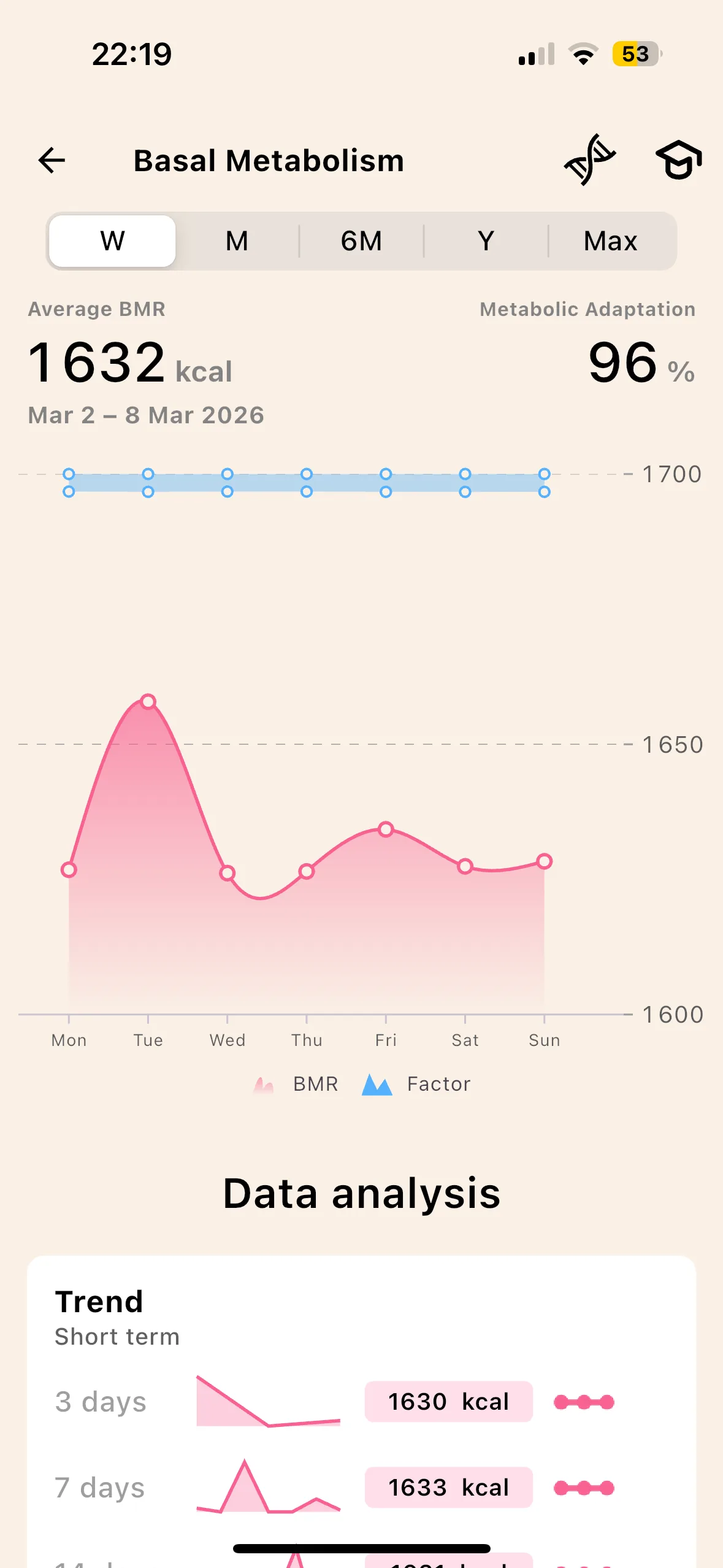
Proprietary patented model, built on lean mass
A perfectly presented keto or Mediterranean plan is still calibrated on a calorie target. If that number is off by 300 kcal, so is the program. Lean computes the metabolism on your lean mass, the only one that really burns at rest.
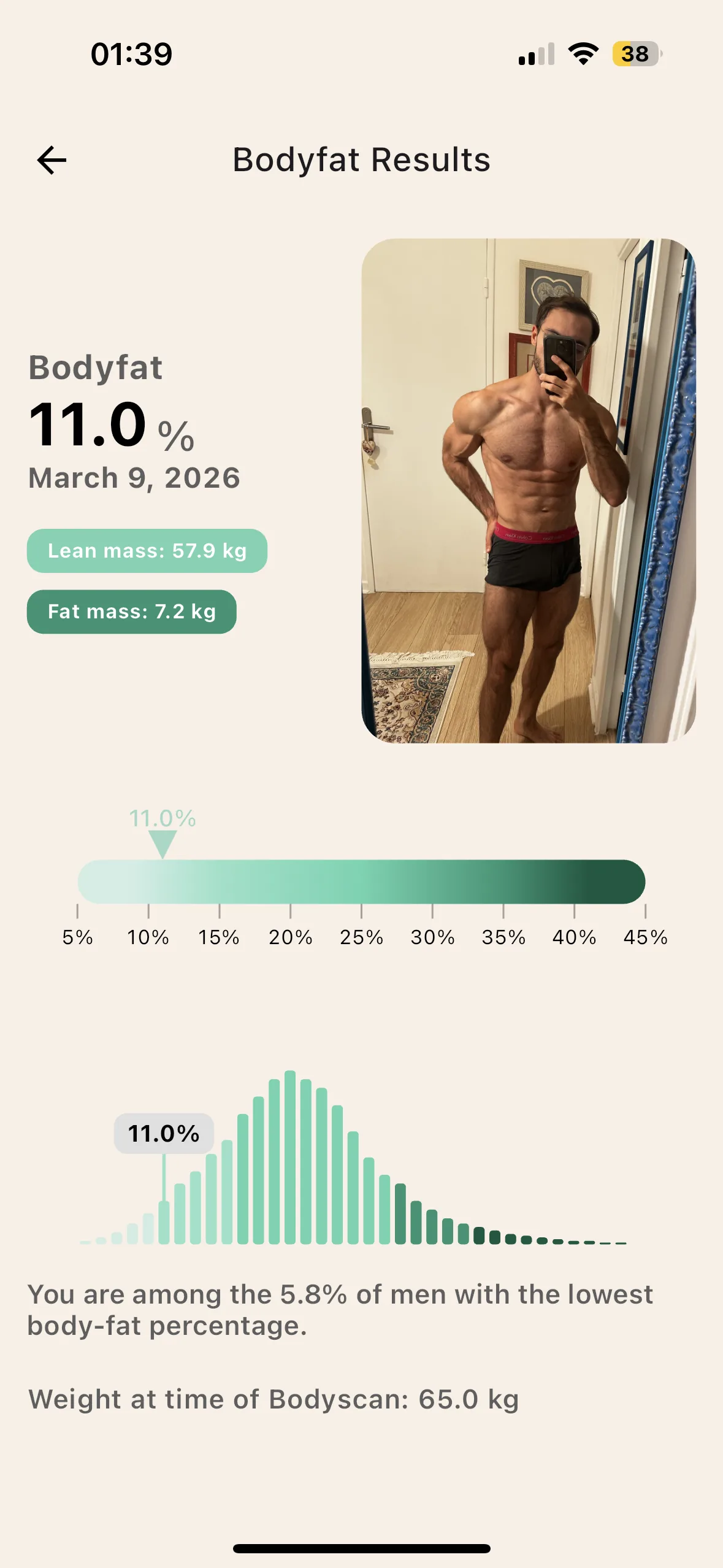
The AI BodyScan solves the measurement: one photo analyzed by a model trained on a bank of DEXA scans, your body fat in a few seconds, to redo every week. The metabolism recomputes itself behind it.
No skinfold calipers, no impedance scale dependent on your hydration, no DEXA. One photo a week.
NEAT, EAT, TEF calculated separately
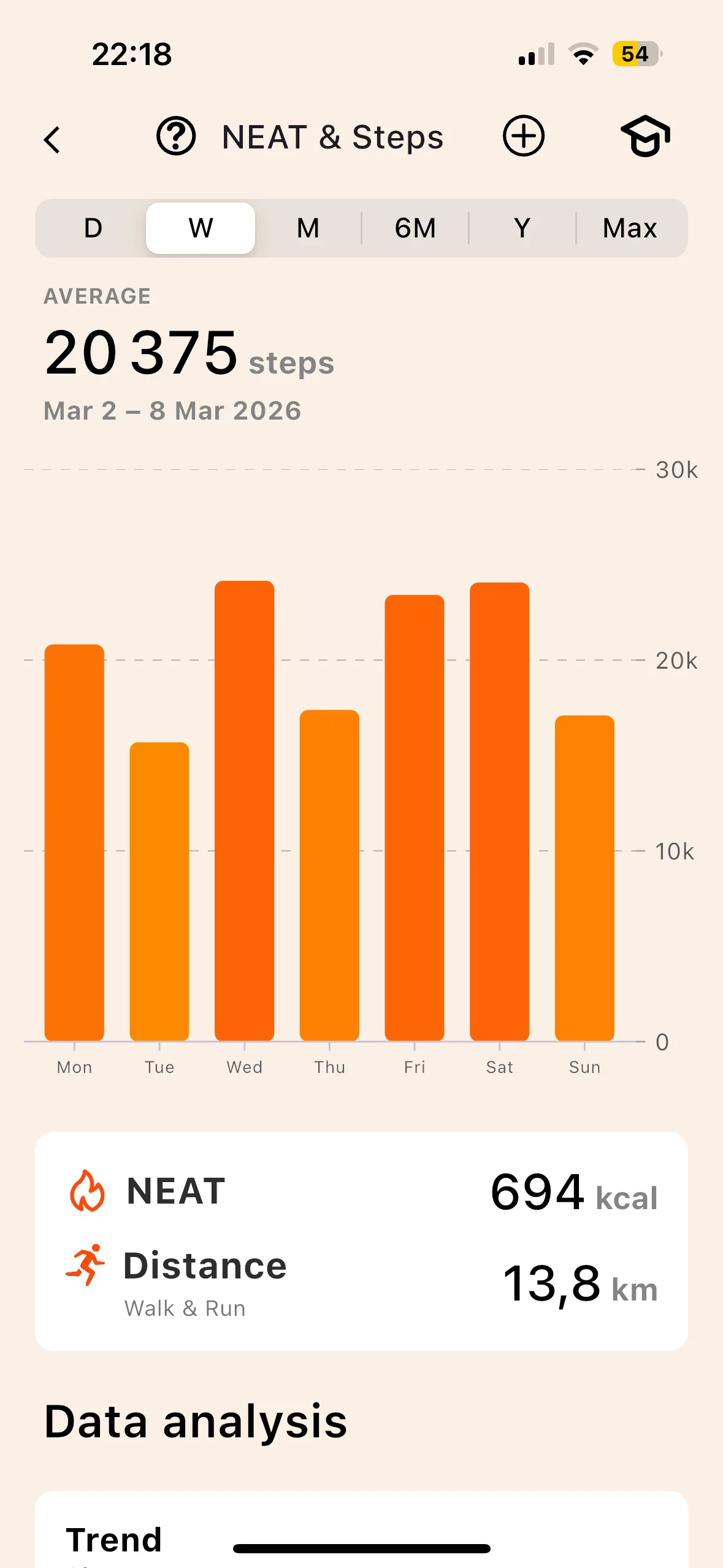
NEAT. Your real steps come from HealthKit (iOS) or Google Fit (Android). A themed program makes no difference between your remote-work week and your holiday week: Lean does, because it reads your steps instead of asking for your activity level.
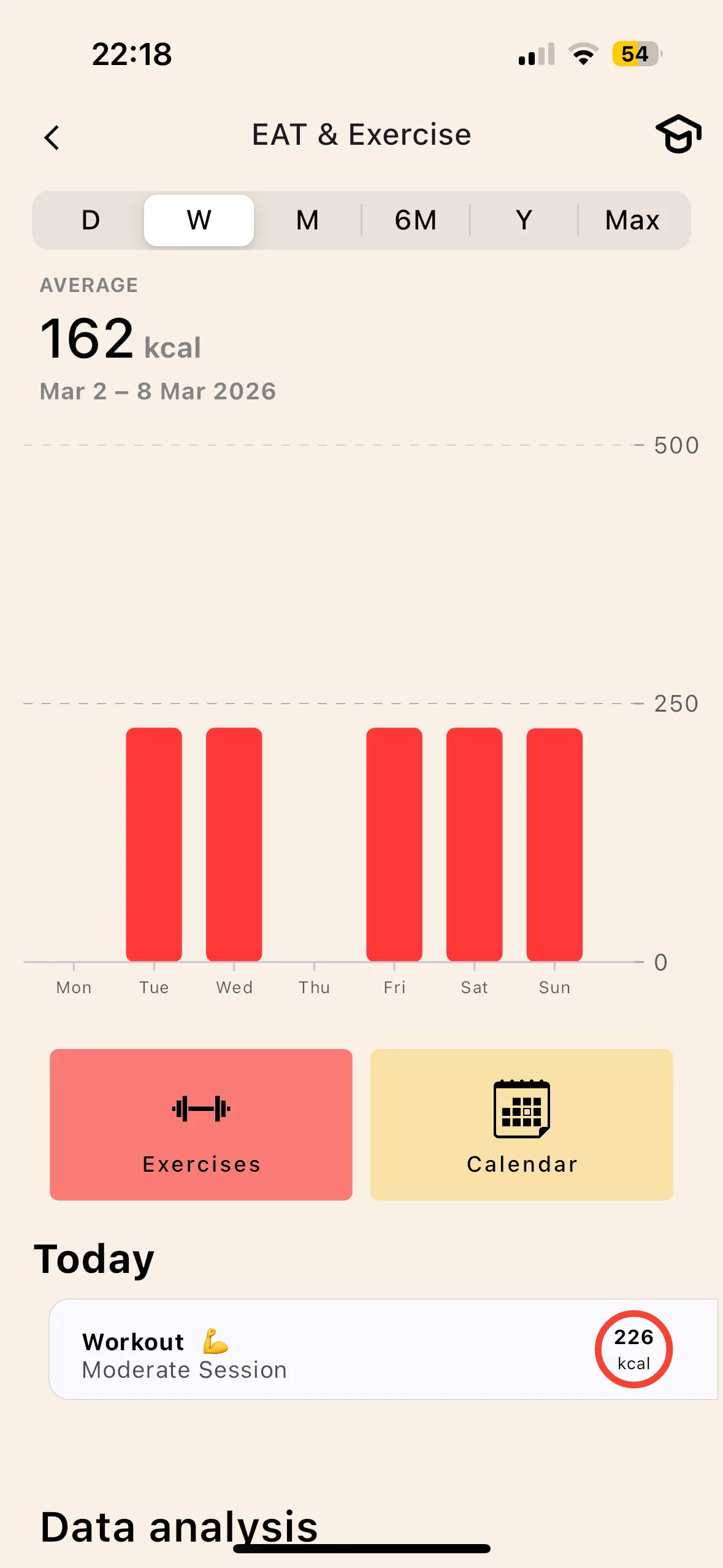
EAT. Each session is quantified by MET on your actual effort time. An hour of lifting with its idle time is not worth an hour of continuous running, and counting both the same distorts your weekly balance.
TEF. Digesting costs energy, at very different rates depending on the macros: 20 to 30% for protein, 5 to 10% for carbohydrates, 1 to 3% for fat. A high-protein diet therefore changes your expenditure, which a flat 10% does not reflect.
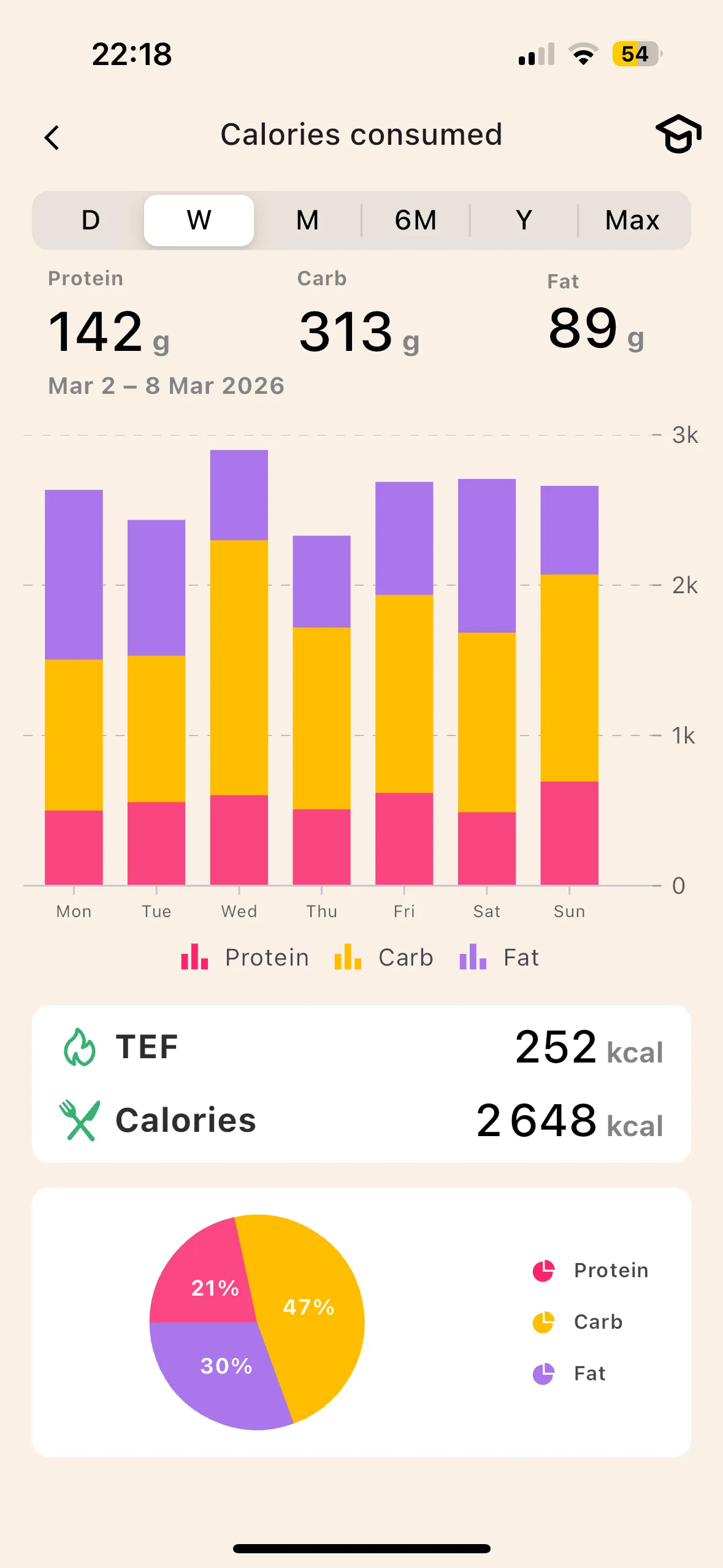
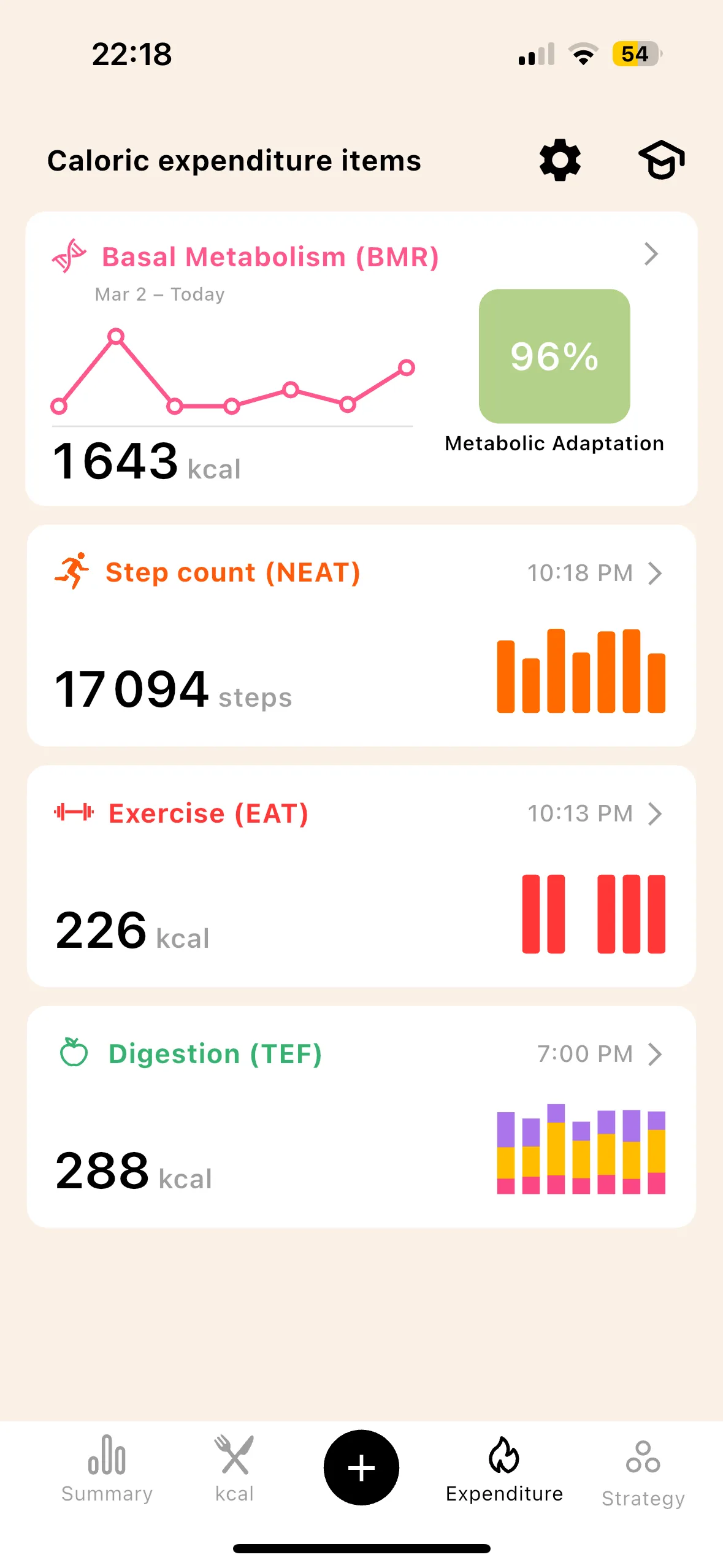
A world first on a consumer app
Metabolic adaptation. That is what explains why a program followed to the letter stops working after two months. Lean adjusts your TDEE downward according to the published ranges (Müller 2015, Doucet 2001) instead of keeping the same target from the first day to the last.
Beyond 10 to 15% adaptation, the app may advise a return to maintenance to restart the metabolism. Cycle, plateau, cycle, as in real protocols.
No activity level to select at sign-up. Every component is measured, week after week.
Lean versus Lifesum, criterion by criterion
An honest read of each app's strengths and weaknesses. No criterion touches price.
Lean Lifesum
3 ways to track a meal
A beautiful interface is not enough if logging a meal takes too long. Lean relies on three complementary methods so that the gesture stays fast over time.
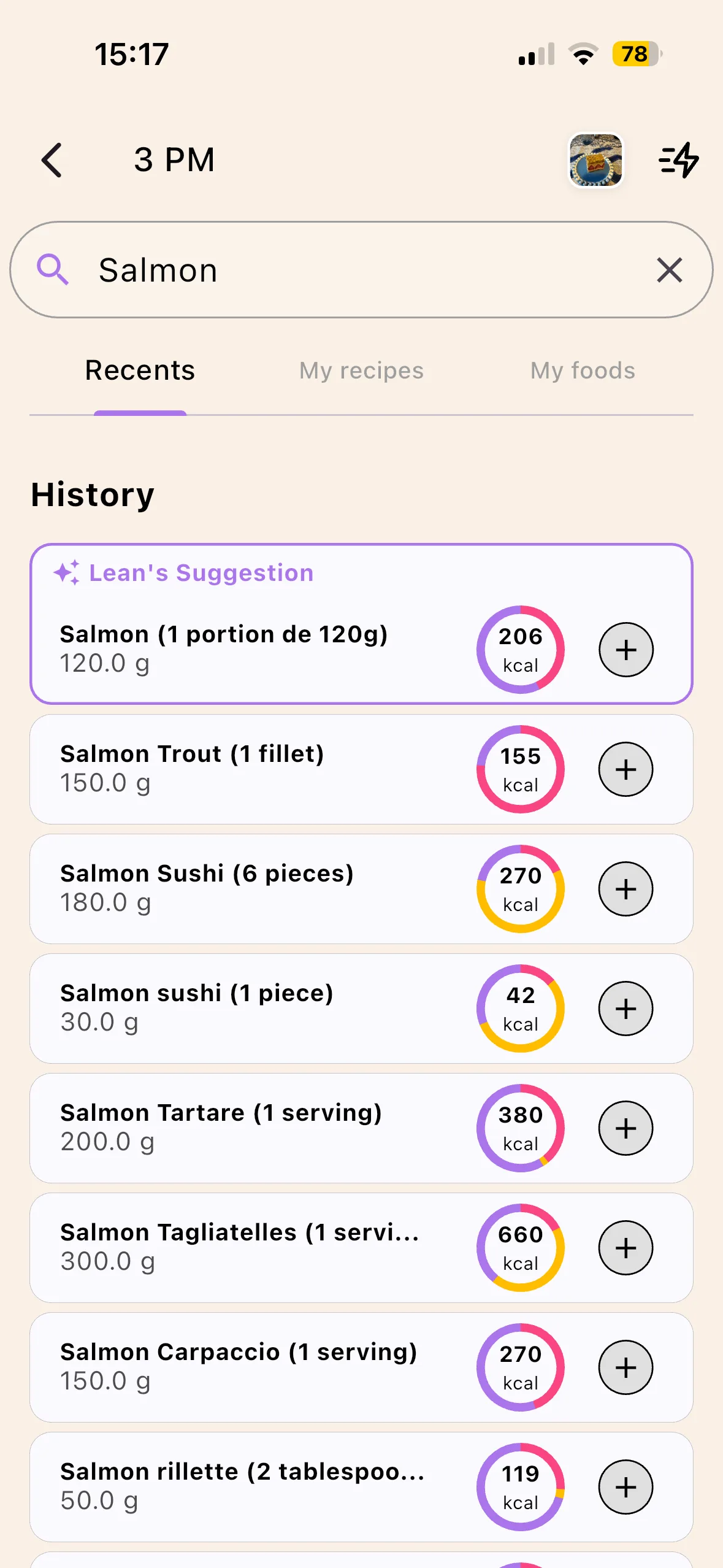

- Database search. Curated base, USDA + OpenFoodFacts. No community noise, no "Roast chicken" entered 47 times by 47 different users with 47 different values.
- Barcode scan. Standard. You scan your pasta box, you get the macros.
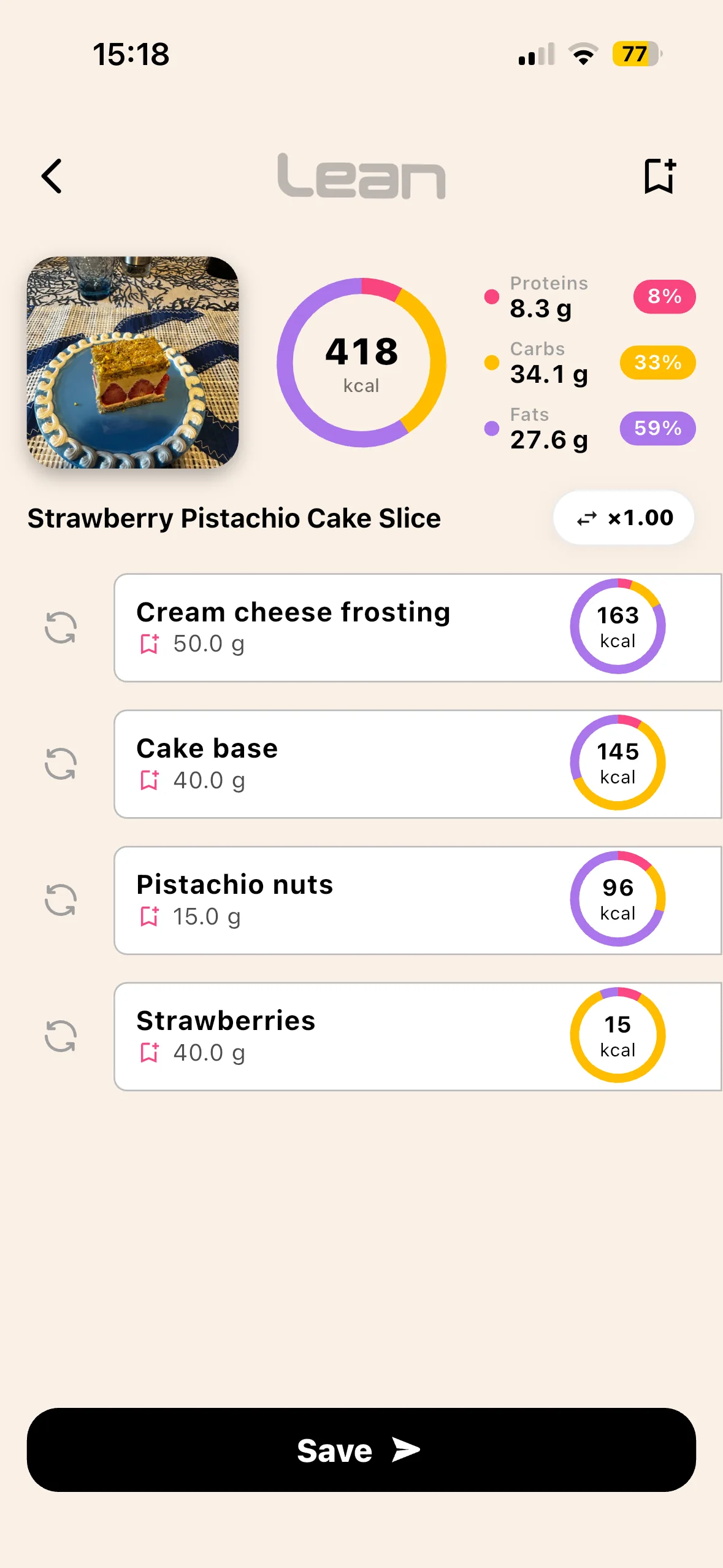
- AI photo scan of a meal. You photograph your plate, the AI detects the foods, you get the calories and macros per food.
AI photo scanning serves first for meals away from home, the ones no pre-written plan anticipates. One photo, and your improvised lunch is logged.
Beyond the meal, Lean shows a TDEE that recomputes during the day with your steps. A themed program sets the same target from Monday to Sunday, whatever your real activity.
And at the top, the Progression Pyramid:
What Lifesum does better
Lean is not perfect, and Lifesum has several real strengths that must be acknowledged. An honest read, criterion by criterion, on the axes where Lifesum remains ahead. None of these axes is secondary: they are real pillars of the Lifesum promise, and the reason behind its massive adoption among the 25-45 wellness-focused female audience.
Lifesum LeanHonest read. On prefabricated diet programs, Lifesum is the mainstream benchmark: keto, Mediterranean, 16:8 intermittent fasting, low-carb, paleo, each with embedded recipes, its onboarding curve, its daily reminders. No other mainstream app has invested as much in this kind of turnkey content. Lean has no prefabricated diet program: you choose your goals and you track, period. On UX, Lifesum is probably the most polished nutrition app on the market: soft palette, polished micro-interactions, onboarding that holds your hand. Lean is clean but more utilitarian, oriented toward precision rather than comfort. On gamification, the Life Score (a daily score out of 100 that summarizes “your healthy day”) is an effective adherence mechanism for those who need a playful visual feedback every evening.
If your main angle is to follow a structured diet program (strict keto, Mediterranean, IF 16:8), if you want a highly polished app experience rather than a precision tool, or if daily gamification helps you stick to it, Lifesum is more relevant than Lean. If your angle is the precision of the TDEE calculation, with bodyfat measured every week via BodyScan AI, and automatic metabolic adaptation, that is exactly what was just demonstrated in the previous 3 sections. Many users run Lean for the measurement and Lifesum in parallel for the program structure, and that is entirely defensible.
Who Lean is built for
4 profiles. If you recognise yourself in at least one, Lean is probably built for you.
You followed a Lifesum program seriously and you did not lose
You followed keto, Mediterranean or 16:8 properly, respected your meals, held it for several weeks, and you stall. The program is not the culprit, it is the TDEE frozen by Mifflin 1990 without bodyfat on which your calorie targets rely. Lean fixes it at the root via a BMR based on real bodyfat.
You plateau after several weeks of cutting
Plateau that drags on after 4 to 8 weeks. That’s metabolic adaptation. Lean computes it automatically and readjusts your goal every week.
You want to understand your metabolism
Lean shows each component (BMR, NEAT, EAT, TEF) and explains adaptation separately, instead of hiding everything behind a single number. You see where every kcal of expenditure comes from.
You want tracking that lasts 12 months
AI photo scan + curated database + barcode cover every use case, from raw ingredient to restaurant pizza. That's what makes the difference between sticking with it and giving up.
Lifesum remains more relevant for : following a structured diet program (keto, Mediterranean, 16:8 intermittent fasting, low-carb), enjoying a highly polished wellness-oriented app UX, or leaning on the Life Score gamification to hold the line daily. TDEE computation precision and metabolic adaptation are simply not part of its core promise.
Switching from Lifesum to Lean (or using both) in 3 minutes
Download Lean
App Store or Play Store. Sign-up in 30 seconds.
AI BodyScan
One photo, 5 seconds. You get your bodyfat.
Weight & height
You enter your weight and height. That’s it.
Lean calculates
BMR on real bodyfat, NEAT via HealthKit / Google Fit (real steps), EAT via MET, TEF via macros, plus metabolic adaptation that modulates the BMR. Automatic.
Log a meal
Photo, barcode or database. You get the flow.
Important note. Lean does not import your Lifesum history automatically, nor your custom recipes. If you follow a Lifesum diet program you want to keep (keto, Mediterranean, 16:8), many users keep consulting the Lifesum plan for their meal structure and recipe ideas, while using Lean daily for TDEE computation and precise tracking. The HealthKit / Google Health Connect sync, on the other hand, takes over immediately for your steps and activity history.
What Lean does, and what Lifesum does not (on TDEE)
Six features that exist in no other consumer tracker. They all come from the same principle: compute every TDEE component precisely, not approximate it.
Your real bodyfat, measured from a single photo, redone every week. The data point that flips the entire BMR calculation. No other consumer app offers this.
Track your restaurant meal in 2 seconds. No scale, no manual entry. The adherence game-changer over 12 months.
Your TDEE re-adjusts week after week following the scientifically established numbers. You avoid the plateaus nobody can explain.
BMR + NEAT + EAT + TEF each shown, updated throughout the day. No more frozen 8am number. You see your calorie balance live.
Track weight, bodyfat, lean mass trends over months. Understand your cycles. Spot the phases where you progress and the ones where you stall.
Photo, barcode, curated database. No other app offers all three with this level of precision. You pick the method based on context.
You install the app for free, you try it without commitment, then you decide if the tool fits your goal.
Frequently asked questions
Lifesum is known for its diet plans, why compare it to Lean on TDEE?
Why doesn't Lifesum calculate BMR on actual bodyfat?
Are the Lifesum Life Score and food ratings a real metabolic measure?
Lifesum imports steps via HealthKit, is that enough for NEAT?
Is Lean free or paid?
Can Lean and Lifesum be used in parallel?
1990 vs 2026
This is not Lifesum vs Lean in marketing. It is premium dietary wrapping versus TDEE precision, two different promises.
Lifesum remains one of the best mainstream apps for diet plans, recipes and UX quality. But for your TDEE, Lifesum uses Mifflin-St Jeor 1990 without bodyfat measured in the app, plus a fixed activity factor you check once at signup (sedentary, low active, regular, active, very active), and ignores metabolic adaptation. The combination of these three makes precise caloric tracking impossible beyond a few weeks of cutting. That is mathematically certain.
Lean was built to do the exact opposite: BMR based on real bodyfat (measured by BodyScan AI) via a proprietary patented model, NEAT from real steps, EAT per sport via MET, TEF from macros, plus metabolic adaptation that modulates the BMR week after week. Every component computed precisely, with no magic coefficient.
Lifesum remains very solid on diet plans, recipes and nutritional education. If you tried Lifesum seriously and did not get the results you hoped for on your cut, the problem is not you, nor Lifesum on its dietary promise. The problem is the frozen TDEE under the hood. Change the engine, keep the culinary inspiration in parallel if you need it.
Lean is available as a free download
iOS and Android. The BodyScan AI works from a single photo. No skinfold calliper, no bioimpedance scale, no DEXA.
Internal links
- Free online TDEE calculator · web version, no sign-up, same logic as the app (BMR + NEAT + EAT + TEF).
- Understand TDEE in depth (BMR, NEAT, EAT, TEF, adaptation) · deep-science article.
- How to count your calories properly · practical guide for beginners.
- NEAT: expenditure from steps and non-exercise activity.
- TEF: digestion burns calories.
References
- Harris J.A., Benedict F.G. (1919). A Biometric Study of Basal Metabolism in Man. Carnegie Institution of Washington.
- Mifflin M.D. et al. (1990). A new predictive equation for resting energy expenditure in healthy individuals. American Journal of Clinical Nutrition.
- Katch V.L., McArdle W.D. (1973). Prediction of body density from simple anthropometric measurements in college-age men and women. Human Biology.
- Frankenfield D.C. et al. (2013). Validation of Mifflin-St Jeor equation in obese and non-obese populations. PubMed 23631843.
- Westerterp K.R. (2004). Diet induced thermogenesis. Nutrition and Metabolism.
- Müller M.J., Bosy-Westphal A. (2013). Adaptive thermogenesis with weight loss in humans. Obesity.
- Schakel S.F., Sievert Y.A., Buzzard I.M. (1988). Sources of data for developing and maintaining a nutrient database (NCCDB). Journal of the American Dietetic Association.