Lean vs Foodvisor. The photo scan pioneer versus the only app that rebuilds your TDEE continuously.
Foodvisor sees your plate. Lean sees your real expenditure. Two AIs, two halves of the problem.
 The Lean Team · 12 min read · Updated August 15, 2026

 Free download
Foodvisor invented meal photo scanning in France and remains a reference for identifying what you eat: photo, food recognition, portion estimation. On the expenditure side, however, Foodvisor relies on a population formula (Mifflin-St Jeor 1990, no measured body fat) and a static activity multiplier chosen at sign-up. Lean takes the problem from the other end: recalculating every component of the TDEE (BMRBasal Metabolic Rate. Energy expended at rest. In Lean, calculated on actual lean mass via BodyScan AI. on real bodyfat via a patented proprietary model, NEATNon-Exercise Activity Thermogenesis. Expenditure from steps and daily activities outside of sport. from steps, EATExercise Activity Thermogenesis. Expenditure from your sport sessions, calculated via MET. via MET, TEFThermic Effect of Food. Energy spent on digestion. Depends on the macros you eat. per macros) and modulate the BMR through metabolic adaptation continuously, with no coefficient to pick.
Foodvisor sees your plate, not your real expenditure
If you are reading this, you have probably already installed Foodvisor. You chose it precisely for what nobody did before it: photographing your plate and letting the AI recognize the chicken, the rice, the sauce, and estimate the portions without pulling out the scale. You entered your weight, height, age and sex, and picked your activity level from a static list. The app showed you a calorie target, say 2,250 kcal to lose weight.
You played along. You scanned your meals, corrected the portions when the AI hesitated, kept a clean log day after day. For the first 6 weeks, it works. You lose. You are happy. Then around week 8, the scale freezes. You tighten the screw. You drop to 2,000 kcal. Again, nothing moves.
Imagine Foodvisor shows you a TDEE of 2,500 kcal. You eat 2,250 (a theoretical deficit of 250 kcal). But in reality, your TDEE has dropped to 2,200 kcal because of metabolic adaptation. You are in a 50 kcal surplus without knowing it. No chance of continuing to lose, even with the cleanest input on the market.
The Foodvisor promise is clear and kept: you know what is on your plate without weighing anything. That is precious. What Foodvisor does not do is recompute your expenditure as the weeks of deficit go by. And that is exactly where the promise stops, even though it is the lever that makes you lose weight.
The 1990 BMR formula, without measured body fat
Estimated BMR. Lean's patented proprietary model takes lean mass into account. Mifflin-St Jeor (a population formula, no body fat) does not. A 500 kcal gap, the equivalent of an entire lunch.
To calculate your basal metabolic rate (BMR, the energy you burn at rest), Foodvisor starts from your profile: weight, height, age, sex. That is the logic of almost every mainstream calorie tracker, inherited from population formulas like Mifflin-St Jeor. And let's be honest: it is better than the Harris-Benedict 1919 that other apps still use.
Mifflin-St Jeor dates from 1990 (PubMed 2305711). The sample is large (498 subjects), the indirect calorimetry methodology is serious, the formula is calibrated on a modern population: 10 × weight (kg) + 6.25 × height (cm) − 5 × age − 161 (women) or +5 (men).
The problem is not the chosen formula. The problem is what no formula of this type can see: it only takes your weight into account. Not your body fat. Not your lean mass. No field in the Foodvisor onboarding asks for your body fat percentage, and no measurement exists in the app.
Yet since the 1980s, we've known that fat mass burns very little energy compared to the rest of the body. The liver, brain, heart, kidneys, and especially muscles are the real energy sinks. Fat mass is inert. Someone at 30% bodyfat does not burn anywhere near as much as someone at 10% bodyfat, even at identical weight.
Frankenfield 2013 (PubMed 23631843) compared Mifflin-St Jeor to reference indirect calorimetry across obese and non-obese cohorts. Result: 87 % accuracy in non-obese subjects, and only 75 % in obese subjects. A more recent study (PMC11820646) shows that for BMIs above 35, Mifflin is off by 250 to 315 kcal per day. That’s a full snack’s worth of error in your deficit calculation.
500 kcal is not nothing. If the app tells you "your BMR is 2,500" when it is actually 2,000, everything downstream is wrong: your deficit target, your projected weekly loss, your macro split calculated as a percentage of TDEE. And no plate photo, however well recognized, corrects a wrong target.
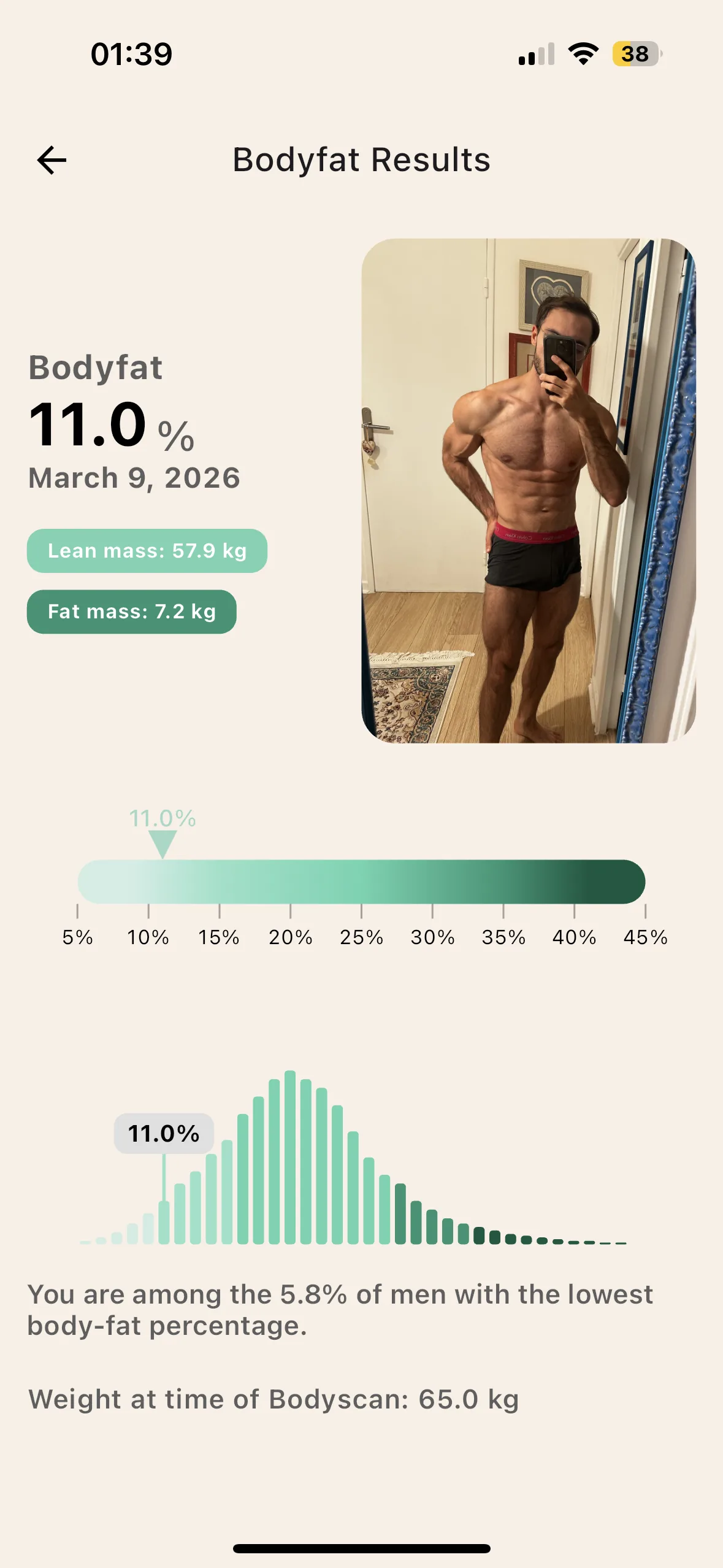
Partial conclusion: if an app calculates your BMR only from your weight, height, age and sex, the result cannot be individualized. It is mathematically impossible. Even with the best plate recognition as input.
The activity multiplier, chosen once and for all
This is where it gets serious. And it’s probably the point nobody ever explained to you.
Once your BMR is estimated, Foodvisor has to get to your total TDEE. The TDEE is BMR plus everything else : expenditure from steps, daily activities, sport, and digestion. Everything that isn't basal metabolism.
How does Foodvisor do that? Like almost every tracker: it asks you, at sign-up, to pick your activity level from a static list. In sports science these factors are called PAL levels (Physical Activity Level), it’s just a multiplier applied to your BMR:
- Sedentary (PAL 1.2): desk job, little walking
- Lightly active (PAL 1.375): occasional walking
- Active (PAL 1.55): sports 3 to 5 times per week
- Very active (PAL 1.725): intense sport almost daily
- Extremely active (PAL 1.9): very intense sport or a physical job
And depending on your choice, the app multiplies your BMR by the matching coefficient. That's it. That's all there is behind your daily calorie target. A box YOU ticked only once at signup. Often six months ago. Untouched since.
And here’s the silent trap: this approximation is wildly imperfect. The difference between a day stuck on the couch watching Netflix and a day at Disneyland walking 15 km with your kids over 1,000 kcal. None of the 5 boxes captures that.
Foodvisor does know how to track your activity: the app can count your steps and log your workouts. But that data mostly serves to display your activity, not to rebuild a full TDEE: your calorie target stays sitting on the multiplier chosen at onboarding, and sports expenditure gets added on top without NEAT and EAT being cleanly separated.
Real expenditure measured over 7 days for a Lean user. The green line is what Foodvisor displayed (a fixed 2,400 kcal, static multiplier × BMR). The pink annotations show why every day moves.
You can’t reduce your activity level to a static box. You might be active in weeks when you barely work from home, and sedentary in weeks when you never leave the office. You might be active in summer and sedentary in winter. You might be active from Tuesday to Friday and sedentary on weekends.
Which box will you tick this week? The truth is that none of the 5 will be correct. So Foodvisor will give you a TDEE that is systematically decorrelated from reality.
The key point of this article: even with a perfect BMR formula, the static multiplier alone would break everything. You cannot estimate a NEAT, EAT and TEF with a single multiplier on top of BMR. Conceptually absurd.
You get the idea: a BMR formula without body fat, plus a static approximation of everything else, leaves you very little chance of reaching your goals over 3 to 6 months. However clean the input on the plate side.
Metabolic adaptation, never modeled
This is the final boss. The most subtle concept. And probably the most important.
When you are in a calorie deficit, your body understands it is receiving less energy than before. To protect itself, it switches into economy mode. Exactly like your iPhone's low power mode: everything keeps working, but using less energy. Your BMR drops. Your NEAT drops. Your EAT drops.
This is called metabolic adaptation. The scientific literature is clear and reproducible: Müller 2015 (PubMed 26399868, Minnesota revisit), Doucet 2001 (PubMed 11430776), Nunes 2020 (PMC7484122) over 6 weeks of deficit. Here are the numbers:
- Deficit of −250 kcal per day, over 2 to 8 weeks: adaptation of 5 to 10% (TDEE drops to 90-95 % of the initial level)
- Deficit of −500 kcal per day: 10 to 15% adaptation (TDEE drops to 85-90 %)
- Deficit of −750 kcal per day: 15 to 25% adaptation (TDEE drops to 75-85 %)
Lean convention: 100 % = optimal, 90 % = 10 % adaptation. And since NEAT, EAT and TEF all depend directly on the BMR, almost the entire TDEE is impacted.
real TDEE over 8 weeks of deficit at −500 kcal/day. The pink curve goes down. The Foodvisor line stays flat. By week 6, you are already at maintenance. Without having changed anything.
Concretely: if you planned a 10 % deficit on a TDEE of 2,500 (eating 2,250 per day), and your body adapts by 10 %, your real TDEE has dropped to 2,250. You’re at maintenance. You stop losing.
The trap is how insidious it is. At first, you lose weight. You’re happy. You keep going. But week after week, the adaptation stacks. And at some point, without changing anything in your tracking, you stop losing.
95% of people go through this without understanding. They blame their willpower. They blame their "broken metabolism". They jump into harsher diets, which makes adaptation worse. Spiral.
Foodvisor never calculates metabolic adaptation. It gives you a fixed calorie target as long as you do not manually update your weight and activity level. You can scan your plates with exemplary consistency, but when you plateau after 6 weeks of cutting, the app has no idea why.
How Lean fixes each of the 3 problems
Foodvisor set a standard for photo scanning a dish, and its recognition of French cuisine remains excellent. The problem is not what it sees on your plate, it is what it does not see of your body: expenditure is still estimated by a population formula multiplied by an activity level. Lean does both: AI photo scanning and measurement of every component of TDEE (BMR + NEAT + EAT + TEF) plus metabolic adaptation. Here is the detail.
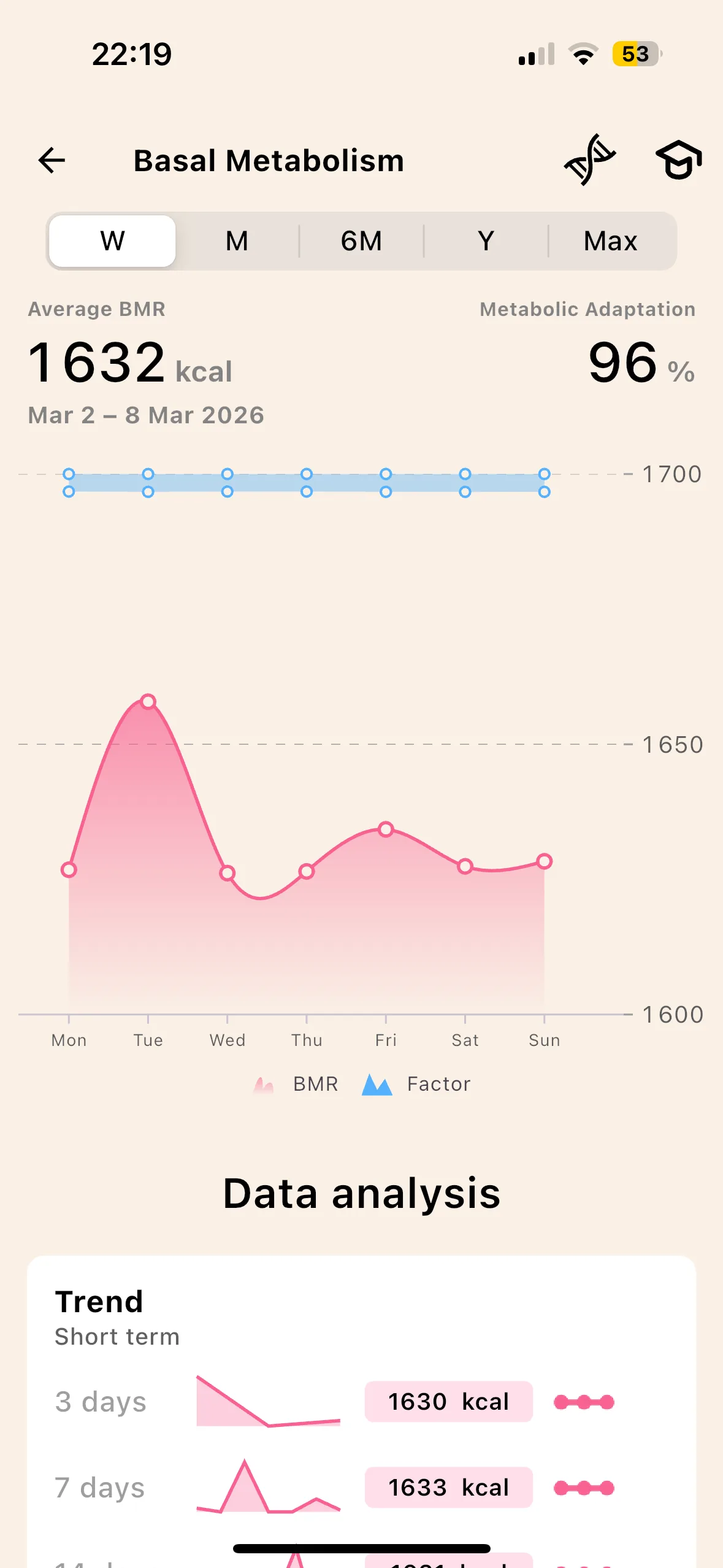
Proprietary patented model, built on lean mass
Counting incoming calories perfectly is useless if outgoing calories are off by 300 kcal. Lean computes the metabolism on your lean mass, the only one that really burns at rest, and not on your raw weight.
The AI BodyScan applies to your body what Foodvisor applies to your plate: one photo, a model trained on a bank of DEXA scans, your body fat in a few seconds, to redo every week.
No skinfold calipers, no impedance scale, no DEXA. The same simplicity as a meal scan, applied to your body composition.
NEAT, EAT, TEF calculated separately
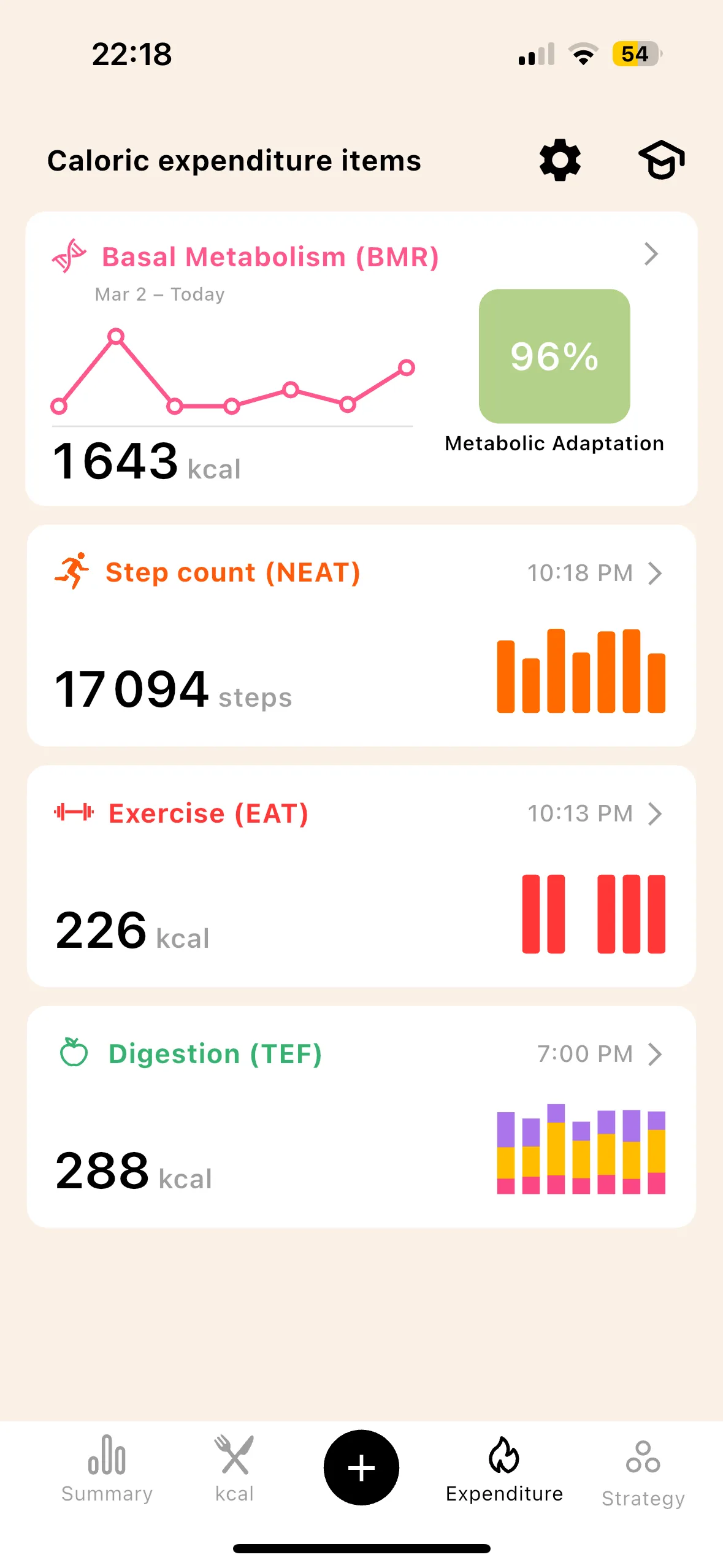
NEAT. Your real steps arrive via HealthKit (iOS) or Google Fit (Android) and become calories according to your metabolism. It is the most variable item of the day, and the one a declared activity level flattens completely.
EAT. Each session is quantified by MET on your actual effort time, rest periods excluded. Counting an hour of lifting as an hour of running distorts the balance by several hundred kcal per week.
TEF. Foodvisor identifies your foods, Lean derives the cost of digestion from them: 20 to 30% of calories for protein, 5 to 10% for carbohydrates, 1 to 3% for fat, instead of the flat 10% applied everywhere.
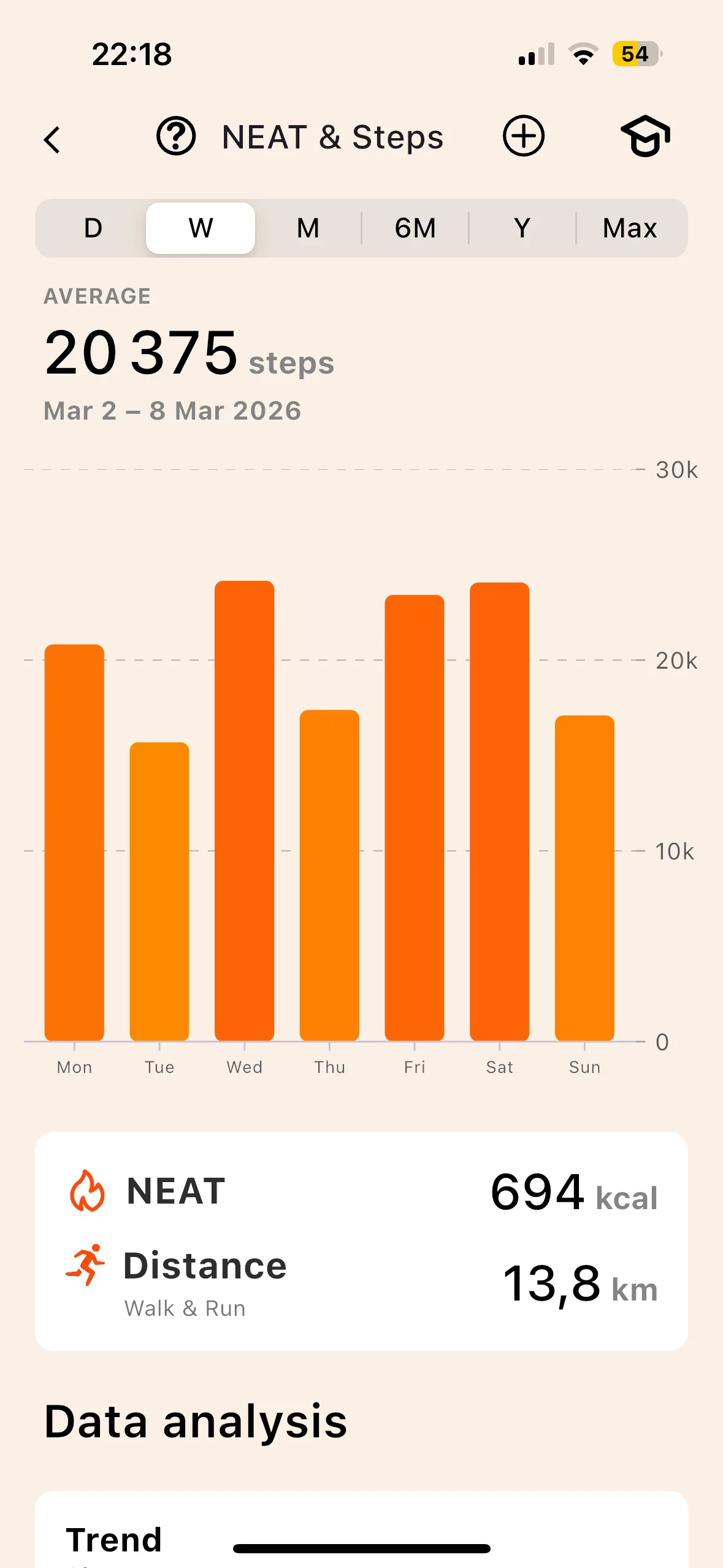
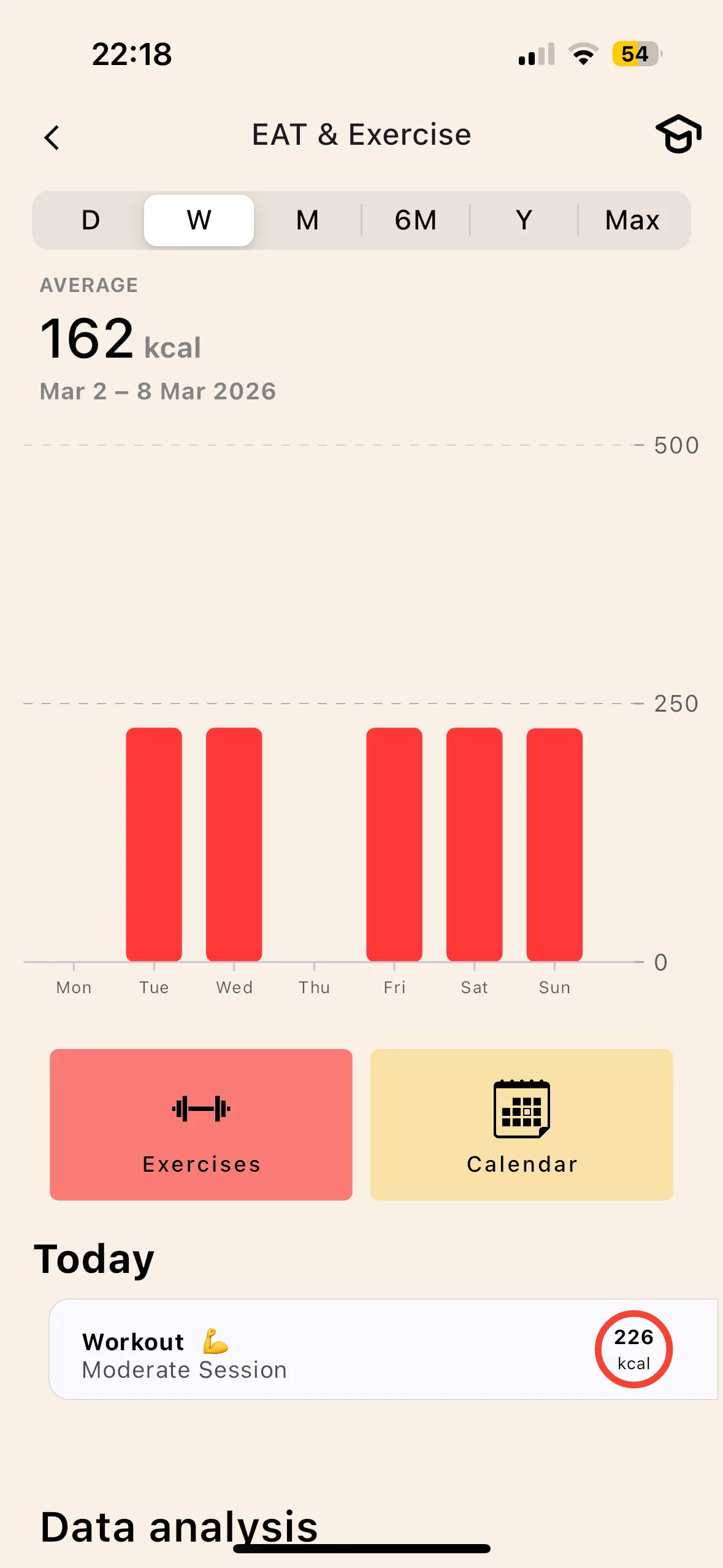
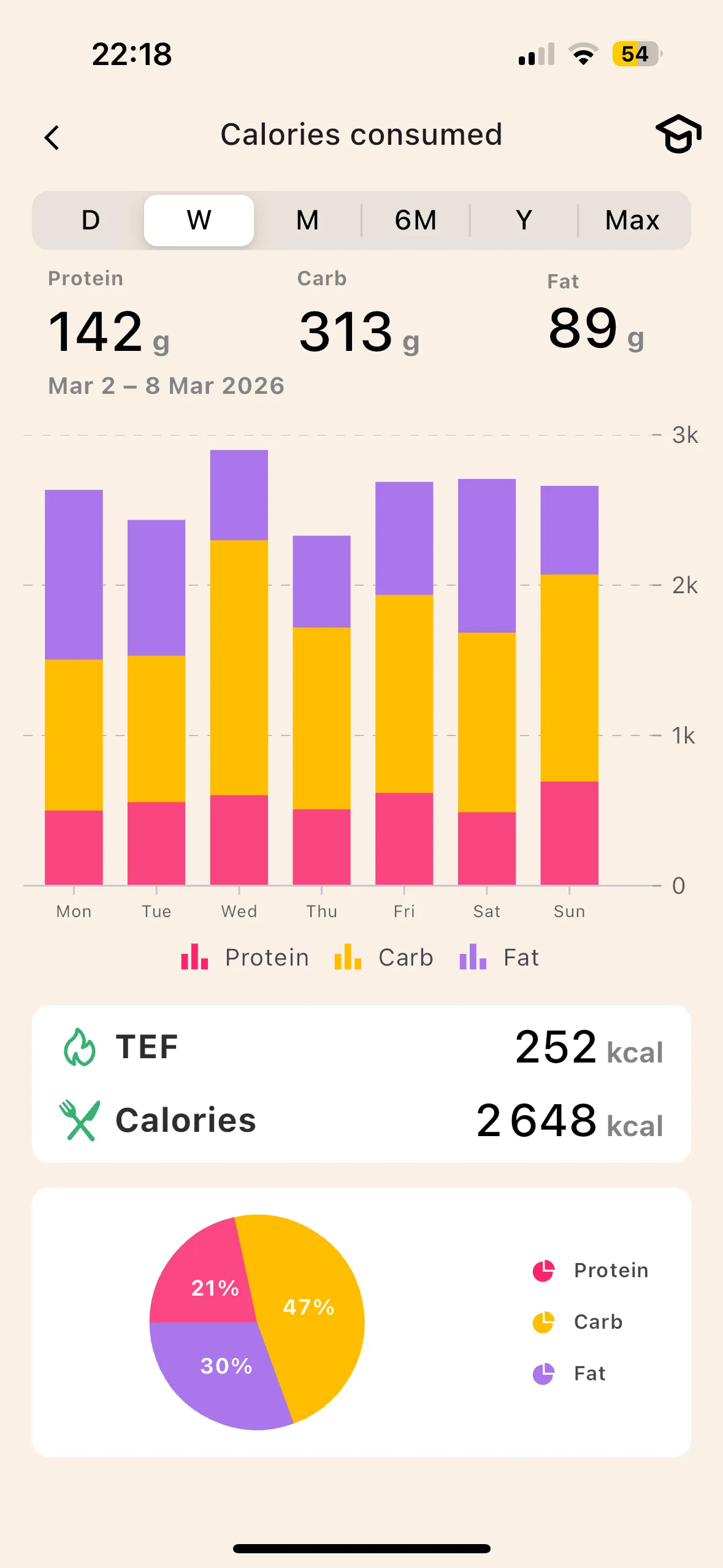
A world first on a consumer app
Metabolic adaptation. No meal scan detects that your metabolism has slowed by 12% after eight weeks. Lean estimates it from the published ranges (Müller 2015, Doucet 2001) and corrects your target accordingly.
Beyond 10 to 15% adaptation, the app may advise a return to maintenance to restart the metabolism before going again.
No activity multiplier to choose. Every component is measured, week after week.
Lean versus Foodvisor, criterion by criterion
An honest read of each app's strengths and weaknesses. No criterion touches price.
 Lean Foodvisor
3 ways to track a meal
Foodvisor proved that a photo could replace manual entry. Lean takes that idea and widens it: three logging methods depending on the context, to last over time.
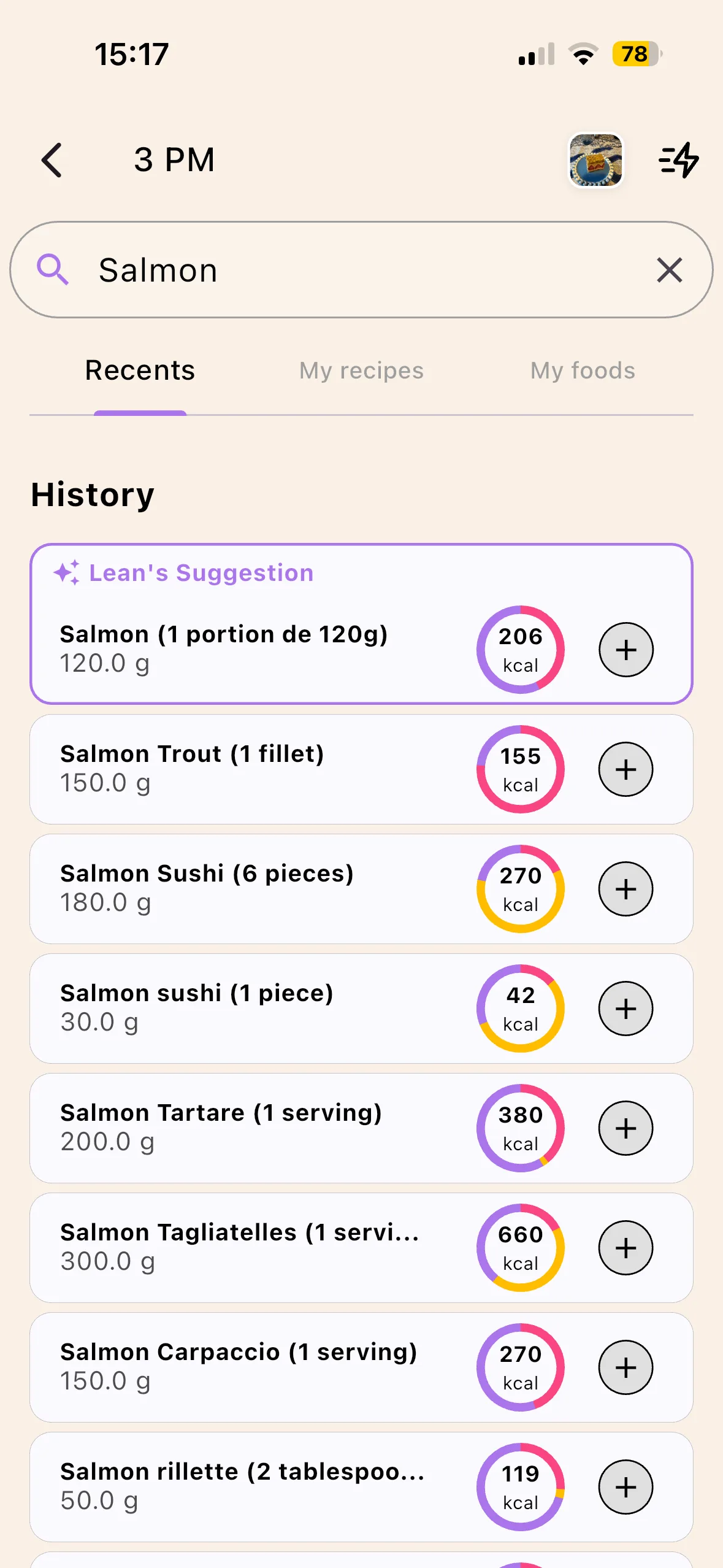
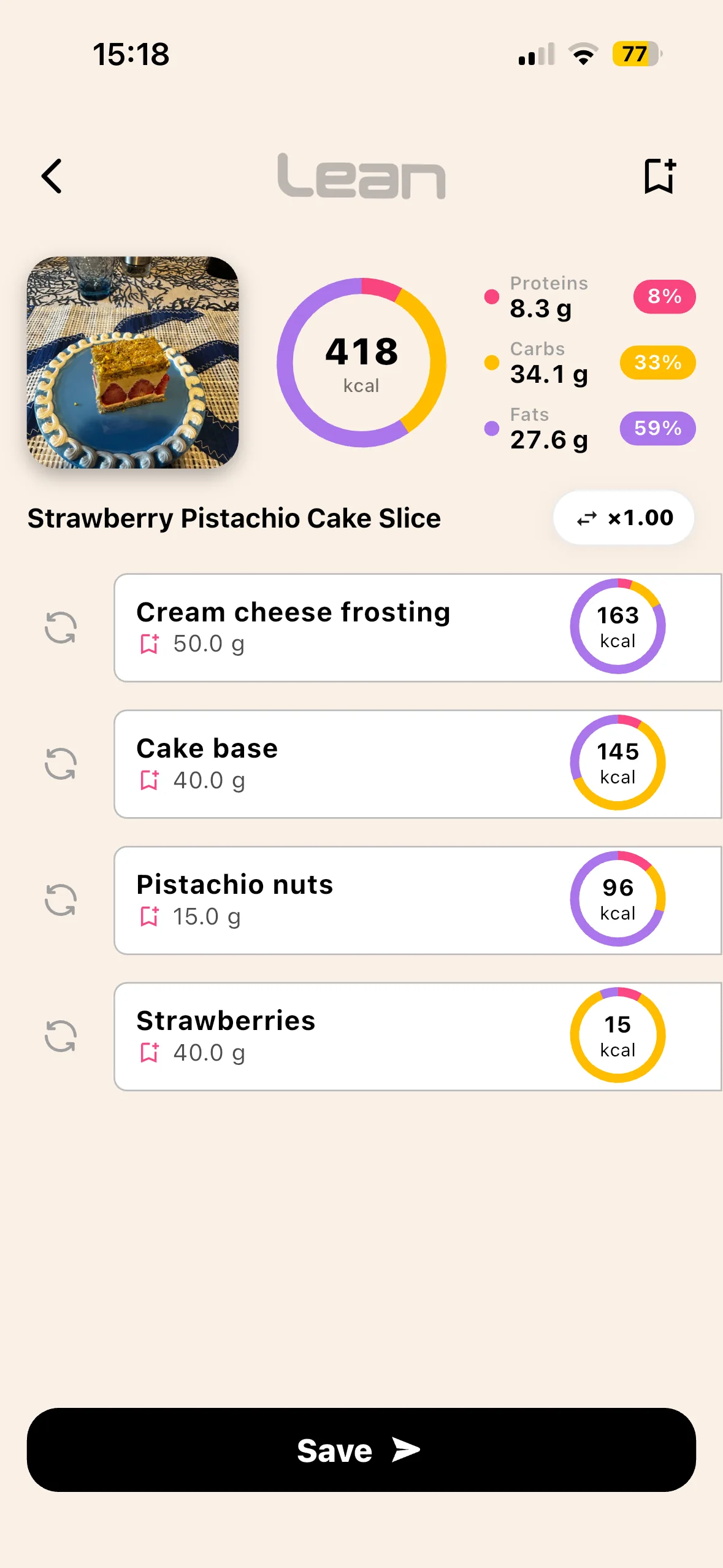
- Database search. Curated base, USDA + OpenFoodFacts. No community noise, no "Roast chicken" entered 47 times by 47 different users with 47 different values.
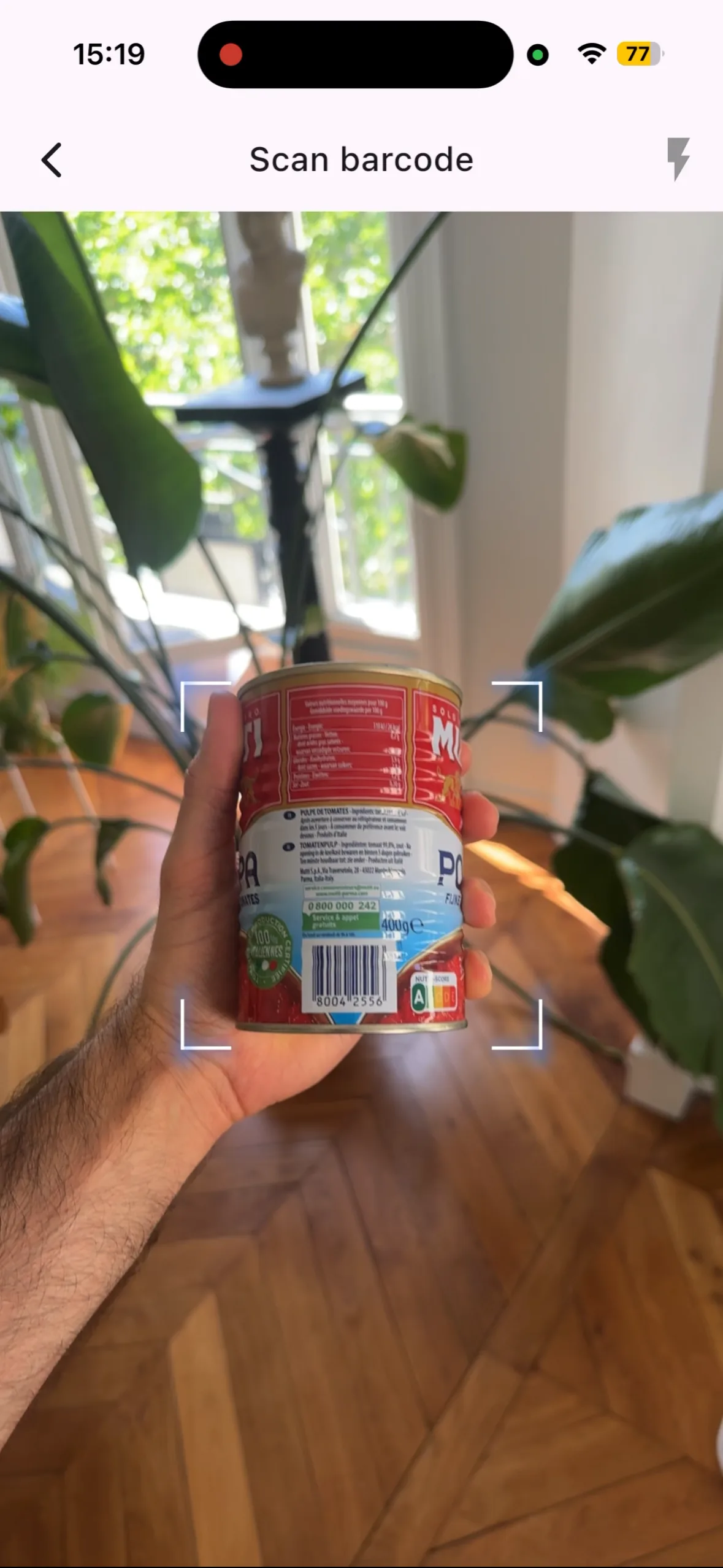
- Barcode scan. Standard. You scan your pasta box, you get the macros.
- AI photo scan of a meal. You photograph your plate, the AI detects the foods, you get calories and macros per food. The reflex you already have if you come from Foodvisor: you keep it as is.
Lean's AI photo scan plays the same role as Foodvisor's for meals eaten out. The difference lies elsewhere: what Lean then does with those calories, by setting them against a measured expenditure rather than an estimated one.
Beyond the meal, Lean shows a TDEE that updates during the day with your steps. Scanning a plate perfectly against a frozen calorie target is not enough.
And above it, the Progression Pyramid:
What Foodvisor does better
Lean is not perfect, and Foodvisor has several real strengths that deserve recognition. An honest read, criterion by criterion, on the axes where the pioneer stays ahead. None of these axes is secondary: they are real pillars of the Foodvisor promise.
Foodvisor LeanHonest read. On plate recognition, Foodvisor created the category in France in 2018 and its AI has years of training ahead: food identification, portion estimation without a scale, handling of mixed dishes. It is its historical playground and it remains the reference there. On human support, Foodvisor offers follow-up by registered dietitians directly in the app: Lean does not offer it, and does not claim to replace it. Lean's AI photo scan is modern, unlimited and largely sufficient for daily use, but Lean does not claim first-mover status on that ground.
If your main angle is the most seasoned plate identification possible, or human coaching built into the app, Foodvisor is more relevant than Lean. If your angle is the precision of the TDEE calculation, body fat measured every week via BodyScan AI, and automatic metabolic adaptation, that is exactly what was just demonstrated in the previous 3 sections. Some people run both apps in parallel while they decide, and that is entirely defensible.
Who Lean is built for
4 profiles. If you recognise yourself in at least one, Lean is probably built for you.
You used Foodvisor seriously and you did not lose
You scanned your plates, corrected the portions, followed an honest deficit for weeks, and you are plateauing. The photo is not the culprit, the frozen target calculated without body fat is. Lean fixes it at the root with BMR based on real body fat.
You plateau after several weeks of cutting
Plateau that drags on after 4 to 8 weeks. That’s metabolic adaptation. Lean computes it automatically and readjusts your goal every week.
You want to understand your metabolism
Lean shows each component (BMR, NEAT, EAT, TEF) and explains adaptation separately, instead of hiding everything behind a single number. You see where every kcal of expenditure comes from.
You want tracking that lasts 12 months
AI photo scan + curated database + barcode cover every use case, from raw ingredient to restaurant pizza. That's what makes the difference between sticking with it and giving up.
Foodvisor remains more relevant for : human coaching by registered dietitians directly in the app, and the most seasoned plate recognition on the French market. Expenditure calculation precision and metabolic adaptation are simply not part of its core promise.
Switching from Foodvisor to Lean (or using both) in 3 minutes
Download Lean
App Store or Play Store. Sign-up in 30 seconds.
AI BodyScan
One photo, 5 seconds. You get your bodyfat.
Weight & height
You enter your weight and height. That’s it.
Lean calculates
BMR on real bodyfat, NEAT via HealthKit / Google Fit (real steps), EAT via MET, TEF via macros, plus metabolic adaptation that modulates the BMR. Automatic.
Log a meal
Photo, barcode or database. You already know the gesture.
Important note. Lean does not automatically import your Foodvisor history, nor your favorite foods. If your follow-up with a Foodvisor dietitian matters to you, nothing stops you from keeping both during the transition: Foodvisor for the human support, Lean for TDEE and daily tracking. HealthKit / Google Health Connect sync, on the other hand, takes over immediately for your steps and activity history.
What Lean does that Foodvisor does not (on expenditure)
Six features centered on expenditure, nowhere to be found in Foodvisor. They all stem from the same principle: calculate every TDEE component precisely, do not approximate it.
Your real bodyfat, measured from a single photo, redone every week. The data point that flips the entire BMR calculation. No other consumer app offers this.
Your TDEE re-adjusts week after week following the scientifically established numbers. You avoid the plateaus nobody can explain.
BMR + NEAT + EAT + TEF each shown, updated throughout the day. No more frozen 8am number. You see your calorie balance live.
Your steps, measured by your phone, feed the TDEE calculation directly every day. No sedentary or active box to tick, ever.
Digestion is not a flat 10%. Protein 20 to 30%, carbs 5 to 10%, fats 1 to 3%. Lean does the math at every meal and feeds it into your TDEE.
Track weight, bodyfat, lean mass trends over months. Understand your cycles. Spot the phases where you progress and the ones where you stall.
You install the app for free, you try it without commitment, then you decide if the tool fits your goal.
Frequently asked questions
Foodvisor invented meal photo scanning, so why compare it to Lean?
Why doesn't Foodvisor calculate BMR from real body fat?
Is Lean's photo scan as good as Foodvisor's?
Foodvisor counts my steps, isn't that enough for NEAT?
Is Lean free or paid?
Can you use Lean and Foodvisor side by side?
The plate is solved. Expenditure is not.
This is not Foodvisor versus Lean as a marketing match. It is input versus output, two halves of the same equation.
Foodvisor solved the left half: knowing what you eat, without a scale, thanks to the most seasoned photo scan on the French market. But for the right half, your expenditure, Foodvisor relies on a 1990 population formula without measured body fat, a frozen activity multiplier you tick once at sign-up, and no metabolic adaptation. The combination of the three makes any precise calorie tracking impossible beyond a few weeks of cutting. It is mathematical.
Lean was built for that half: BMR based on the real bodyfat (measured by BodyScan AI) via a proprietary patented model, NEAT from real steps, EAT per sport via MET, TEF from macros, plus metabolic adaptation that modulates BMR week after week. Every component calculated precisely, with no magic coefficient. And the photo reflex you picked up with Foodvisor, you keep it: the AI photo scan is built in, unlimited.
If you tried Foodvisor seriously and did not get the results you hoped for on your cut, the problem is not you, nor the photo. The problem is the frozen TDEE under the hood. Change the engine, keep the reflex.
Lean is available as a free download
iOS and Android. The BodyScan AI works from a single photo. No skinfold calliper, no bioimpedance scale, no DEXA.
Internal links
- Free online TDEE calculator · web version, no sign-up, same logic as the app (BMR + NEAT + EAT + TEF).
- Understand TDEE in depth (BMR, NEAT, EAT, TEF, adaptation) · deep-science article.
- How to count your calories properly · practical guide for beginners.
- NEAT: expenditure from steps and non-exercise activity.
- TEF: digestion burns calories.
References
- Harris J.A., Benedict F.G. (1919). A Biometric Study of Basal Metabolism in Man. Carnegie Institution of Washington.
- Mifflin M.D., St Jeor S.T. et al. (1990). A new predictive equation for resting energy expenditure in healthy individuals. American Journal of Clinical Nutrition. PubMed 2305711.
- Frankenfield D.C. (2013). Bias and accuracy of resting metabolic rate equations in non-obese and obese adults. Clinical Nutrition. PubMed 23631843.
- Westerterp K.R. (2004). Diet induced thermogenesis. Nutrition & Metabolism. PubMed 15507147.
- Müller M.J. et al. (2015). Metabolic adaptation to caloric restriction and subsequent refeeding: the Minnesota Starvation Experiment revisited. American Journal of Clinical Nutrition. PubMed 26399868.
- Doucet E. et al. (2001). Evidence for the existence of adaptive thermogenesis during weight loss. British Journal of Nutrition. PubMed 11430776.